
Building Agentic Workflows with Microsoft Agent Framework and Docker Model Runner
Today we’ll continue diving into the world of Microsoft Agent Framework (MAF) to craft AI-powered workflows that run locally thanks to Docker Model Runner (DMR). I’ll start by showcasing simple sequences, concurrent executions and branching workflows, without agents, and then elevate these flows by integrating intelligent agents able to manage a set of custom tools. By the end, you’ll see how to let your own agents run local code, manage your filesystem, and leverage the power of MCP servers to work for you in ways only you can imagine. The future starts today. Don’t miss out!
Basic Flows Without Agents
I already showed you how to create agents and how to interact with them. Now it is time to learn to create and use workflows. Let’s begin with the foundation: defining workflows as graphs of Executor nodes that process and route data.
We’ll start simple:
-
Sequential: input → upper → reverse
-
Conditional: input → intent classifier → support/sales/hr
-
Fan-out/Fan-in: input → upper + reverse → aggregate
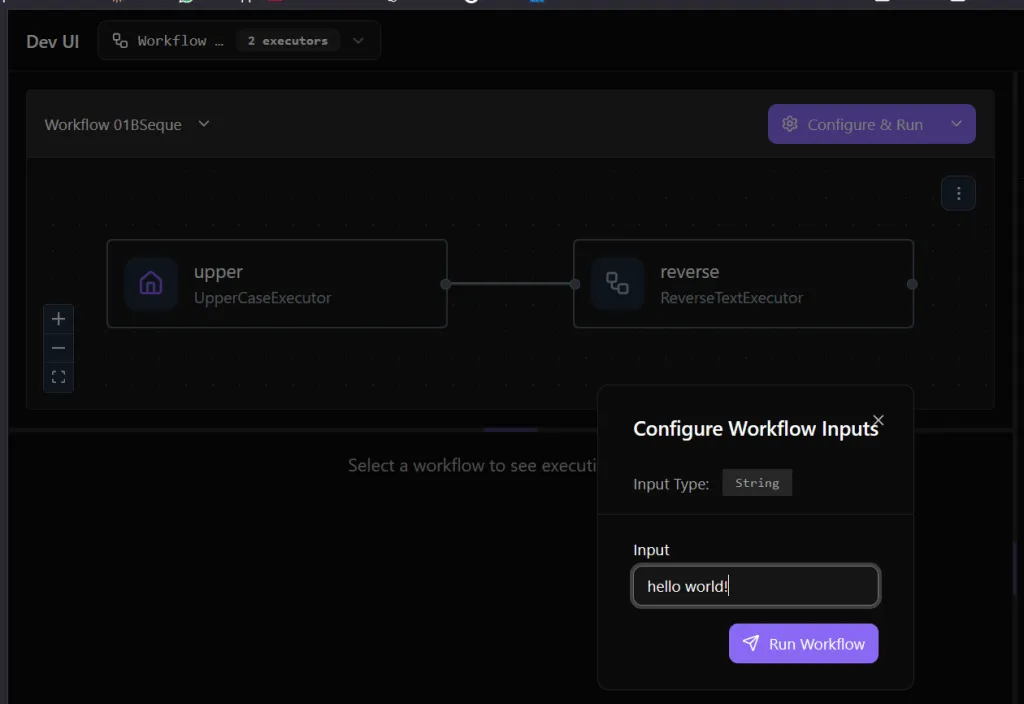
These are already powerful and can be run easily, just clone the repo and launch the Lab P05 - Workflows Demo. You’ll be able to open your browser, select a workflow and run it… Let’s try the Basic Sequence workflow as an example:
# workflows/wf01_basic_sequence.py

from agent_framework import Executor, WorkflowContext, WorkflowOutputEvent, WorkflowBuilder, handler

class UpperCaseExecutor(Executor):
    @handler
    async def to_upper(self, text: str, ctx: WorkflowContext[str]) -> None:
        result = text.upper()
        print(f"[UpperCaseExecutor] Input: '{text}' -> '{result}'")
        await ctx.send_message(result)

class ReverseTextExecutor(Executor):
    @handler
    async def reverse(self, text: str, ctx: WorkflowContext[str]) -> None:
        result = text[::-1]
        print(f"[ReverseTextExecutor] Input: '{text}' -> '{result}'")
        await ctx.yield_output(result)

def build_basic_sequence_workflow() -> WorkflowBuilder:
    upper = UpperCaseExecutor(id="upper")
    reverse = ReverseTextExecutor(id="reverse")

    workflow = (
        WorkflowBuilder()
        .set_start_executor(upper)
        .add_edge(upper, reverse)
        .build()
    )
    workflow.id = "01BSequence"
    return workflow
It will ask for an input because first handler requires a text of type string, I am not sure this is documented.
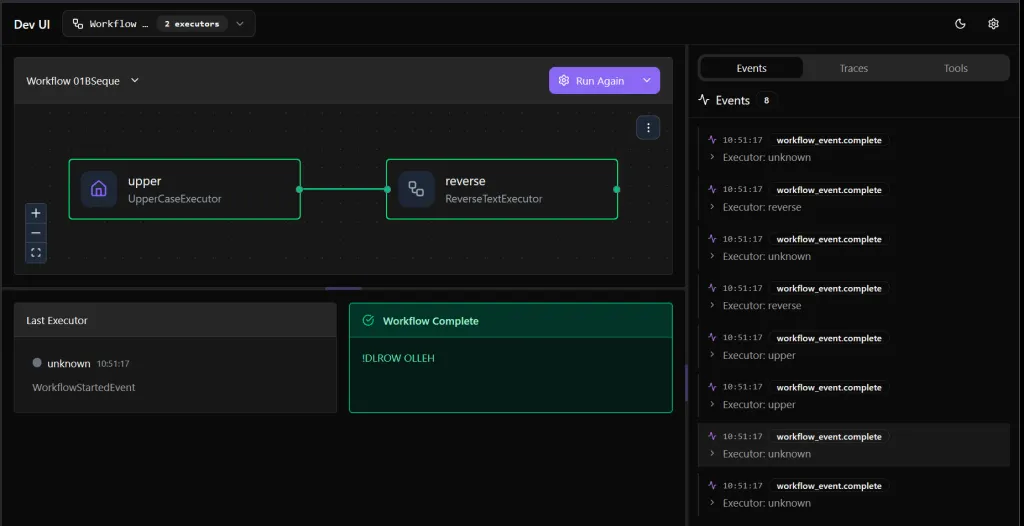
I’ve also improved the logger to be able to trace our execution:

In this case each node is a plain Python class inheriting from Executor. No LLMs, no agents yet.
Workflow 02 - Sequential Executors
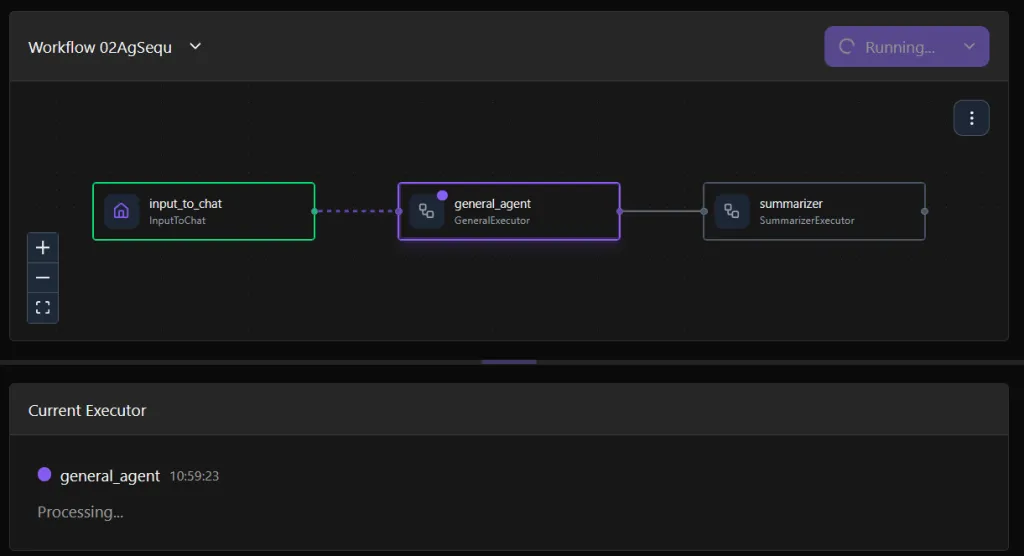
Let’s try now the next one, a sequence asking for an input that will be processed by a General Purpose Agent,whose response will be summarized by a Summarizer Agent.
# ------------------------------------------------------------
# Entry node: plain text → ChatMessage
# ------------------------------------------------------------
class InputToChat(Executor):
    @handler
    async def start(self, text: str, ctx: WorkflowContext[ChatMessage]):
        print(f"[InputToChat] user input: {text}")
        await ctx.send_message(ChatMessage(role="user", text=text))

# ------------------------------------------------------------
# Agent wrappers (use existing ChatAgents from AgentFactory)
# ------------------------------------------------------------
class GeneralExecutor(Executor):
    def __init__(self, factory: AgentFactory, id="general_agent"):
        super().__init__(id=id)
        self.agent = factory.get("GeneralAgent")

    @handler
    async def handle(self, message: ChatMessage, ctx: WorkflowContext[ChatMessage]):
        response = await self.agent.run([message])
        await ctx.send_message(response.messages[-1])

class SummarizerExecutor(Executor):
    def __init__(self, factory: AgentFactory, id="summarizer"):
        super().__init__(id=id)
        self.agent = factory.get("SummarizerAgent")

    @handler
    async def handle(self, messages: ChatMessage, ctx: WorkflowContext[str]):
        response = await self.agent.run([messages])
        await ctx.yield_output(response.text)

# ------------------------------------------------------------
# Workflow definition
# ------------------------------------------------------------
def build_sequential_executors_workflow(factory: AgentFactory):
    entry = InputToChat(id="input_to_chat")
    general = GeneralExecutor(factory=factory, id="general_agent")
    summarizer = SummarizerExecutor(factory=factory, id="summarizer")

    workflow = (
        WorkflowBuilder()
        .set_start_executor(entry)
        .add_edge(entry, general)
        .add_edge(general, summarizer)
        .build()
    )
    workflow.id = "02AgSequence"
    return workflow
I asked “What can ai-powered workflows bring to developers like us?” That text was passed to general agent executor…
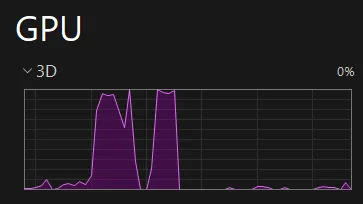
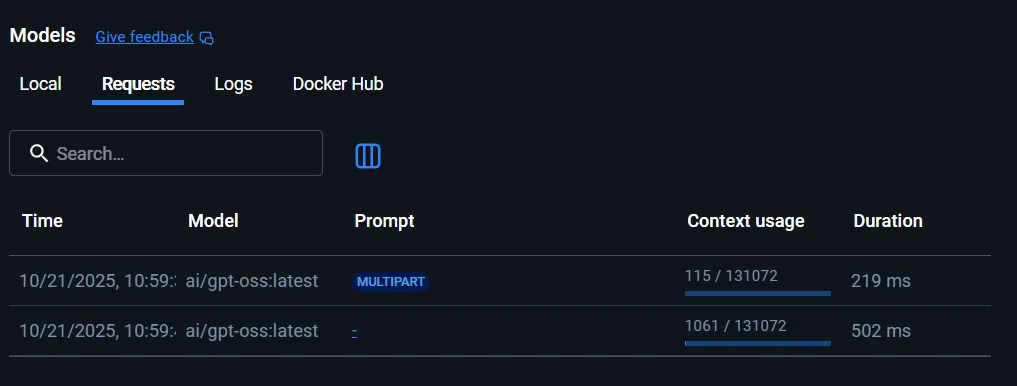
And it ran against Docker Model Runner. You can see two GPU peaks, one per Agent execution. (here we see general_agent execution and summarizer execution):
With an interesting output:

I invite you to run next agents yourself. All this code belongs to lab P05 in this GitHub repository, prepare your environment with a local docker compose up and launch the DevUI to try yourself.
Note: I’ve found and reported many bugs during the development of these workflows.
In next workflow I prepared a conditional branch. It’s quite easy to follow: We get the input, it is pased to an intent classifier (that now is static but we might use a Classifier agent for this).
Workflow 03 - Conditional Branch
This one is a basic example too, no agents involved. It just demonstrates a conditional workflow, which means that next node, next execution step or branch, is selected according to a certain condition. Let’s focus ONLY on how the workflow is built and how it looks like on DevUI:
def build_conditional_branching_workflow() -> WorkflowBuilder:
    normalize = NormalizeInput(id="normalize")
    classifier = IntentClassifier(id="classifier")
    support = SupportExecutor(id="support_exec")
    sales = SalesExecutor(id="sales_exec")
    hr = HRExecutor(id="hr_exec")
    fallback = FallbackExecutor(id="fallback_exec")

    workflow = (
        WorkflowBuilder()
        .set_start_executor(normalize)
        .add_edge(normalize, classifier)
        .add_multi_selection_edge_group(
            classifier,
            [support, sales, hr, fallback],
            selection_func=select_targets,
        )
        .build()
    )

    workflow.id = "03CondBranch"
    return workflow
Let’s run it with this input: “I want to buy groceries”:
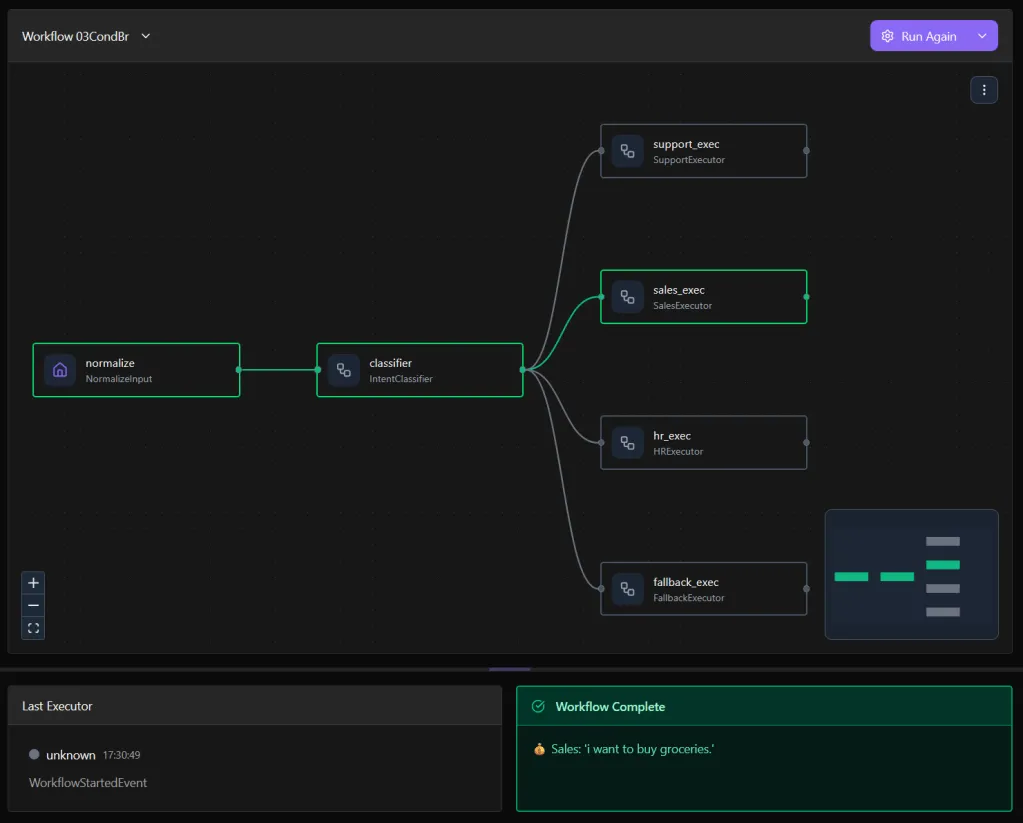
In the example I used a simple and deterministic approach but we could use an agent for this, an expert in deciding what should be the right path according to user input and any other variable available within the workflow.
Workflow 04 - Parallel Fan-out - Fan-in
Using, again, a simplistic (non agentic) approach, I built a workflow that, with “parallel proccessing”, gets a text and changes it to be upper case and also reverted. Let’s forget on the executors and focus on how we build the workflow:
def build_parallel_fanout_workflow() -> WorkflowBuilder:
    dispatcher = FanOutDispatcher(id="dispatcher")
    upper = UpperCaseExecutor(id="upper")
    reverse = ReverseTextExecutor(id="reverse")
    aggregator = AggregatorExecutor(id="aggregator")

    workflow = (
        WorkflowBuilder()
        .set_start_executor(dispatcher)
        # fan-out: dispatcher → upper, dispatcher → reverse
        .add_fan_out_edges(dispatcher, [upper, reverse])
        # fan-in: collect both results into list[str]
        .add_fan_in_edges([upper, reverse], aggregator)
        .build()
    )

    workflow.id = "04ParFanOut"
    return workflow
And, well, the execution looks like this:
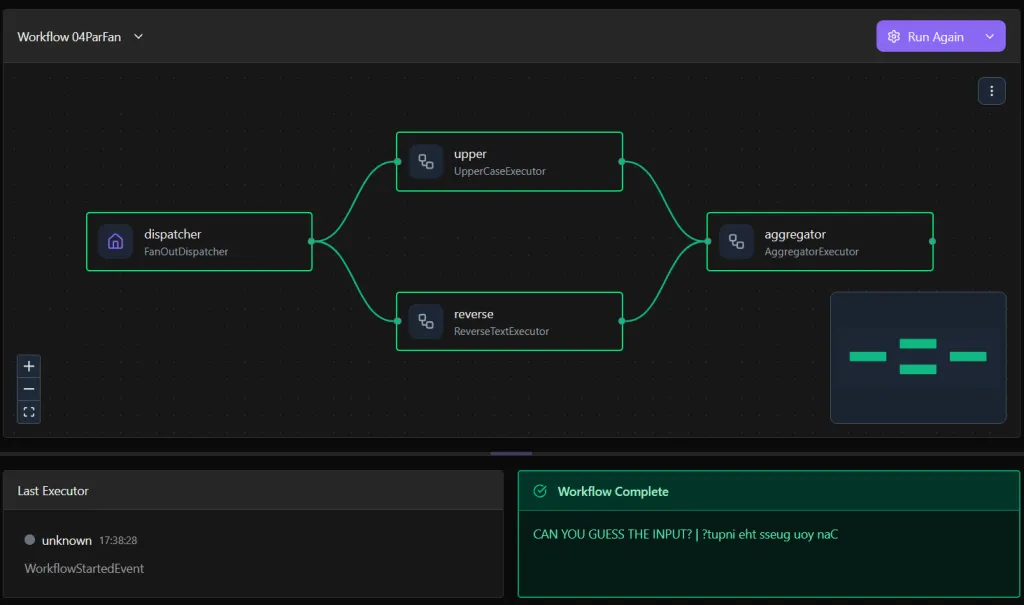
Can you guess the input?
Workflow 05 - Loop With Evaluation
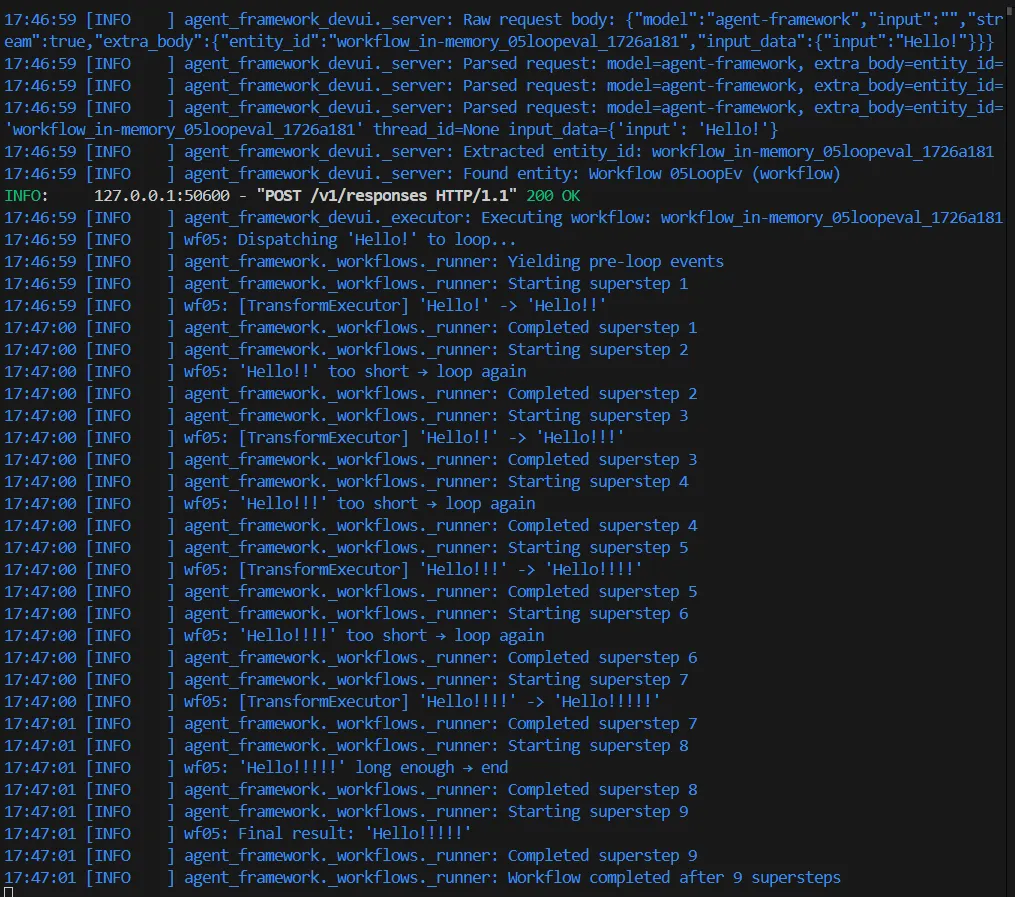
This one demonstrates that, if we can imagine, we can build it. This workflow demonstrates a loop implementation that runs until a condition is met. We have a judge executor, which responsibility is to evaluate the condition and, if is not met, re-execute, else, continue the workflow. Judge executor is quite simple:
class JudgeExecutor(Executor):
    @handler
    async def evaluate(self, text: str, ctx: WorkflowContext[str | dict]) -> None:
        if len(text) < 10:
            logger.info(f"'{text}' too short → loop again")
            await ctx.send_message(text)  # str
        else:
            logger.info(f"'{text}' long enough → end")
            await ctx.send_message({"action": "done", "text": text})  # dict
And the workflow is built like:
def build_loop_with_evaluation_workflow() -> WorkflowBuilder:
    dispatcher = LoopDispatcher(id="dispatcher")
    transform = TransformExecutor(id="transform")
    judge = JudgeExecutor(id="judge")
    output = OutputExecutor(id="output")

    wf = (
        WorkflowBuilder()
        .set_start_executor(dispatcher)
        .add_edge(dispatcher, transform)
        .add_edge(transform, judge)
        .add_edge(judge, transform, condition=lambda d: isinstance(d, str))
        .add_edge(judge, output, condition=lambda d: isinstance(d, dict) and d.get("action") == "done")
        .build()
    )

    wf.id = "05LoopEval"
    return wf
You see? It only adds ’!’ if the text is not long enough… Let me show you the logs of execution:
Workflow 06 - Search and Summarize
Obviously this was the first thing I tried and it took me few hours to make it work as I wanted… I’ve learn how to handle messages and that input and output types between executors matters a lot. If next executor requires a ChatMessage, the current one MUST return a ChatMessage, if it requires a list of strings, it must return a list of strings… It also forced me to “fine tune” my prompts, I mean, prompts in the executors as well as agent instructions. In addition, you’ll see that in this flow we “play” with the context. How? We get and set some values in the shared state so we exchange information between agents, so, we don’t need to pass all the messages, en entire history of messages, but, doing some workflow engineering and trying to be as deterministic as possible within the different steps of the process, I mean, isolating responsibilities per agent and executor, we can have predictable outcomes regardless the input.
I encourage you to review this workflow code here → https://github.com/juangcarmona/ms-agent-framework-playground/blob/main/labs/python/05_workflows_demo/workflows/wf06_search_and_summarize.py
And this is what happens when we execute this via DevUI. I’ll “ask” it “Who writes articles about Microsoft Agent Framework and Docker Model Runner (both topics together)?”
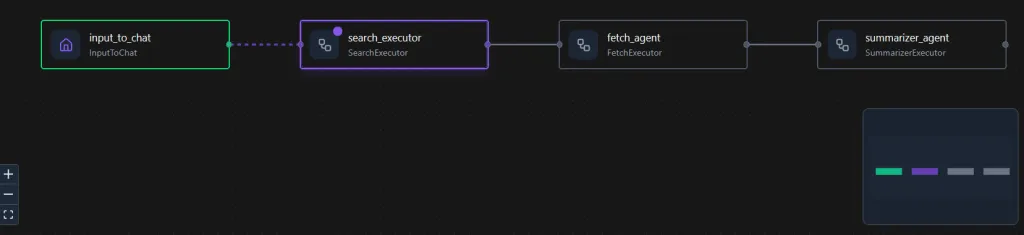
Ah! I forgot to mention. The workflow uses three different agents:
-
One that searches, via DuckDuckGo (I’ll show you this part later on today) and it must select and return most promising URLs. I told this agent to perform few searches, combining terms or adding new ones to try to get better results according to whatever the users asks.
-
Next one gets that list of URLs and use Fetch tool (via a MCP Gateway running on a Docker Container, it is part of what we have on docker-compose.yml file in this lab folder) to fetch all that content. URL By URL… and it passes all that info, that might be a lot, to the next one.
-
Finally, we have a summarizer agent, that, thanks to the executor’s prompt and the workflow’s shared state, knows what was the user’s initial requests and, with all the gathered info from most relevant URLs, summarizes and provides a valuable answer.
To be honest, it is amazing to follow the steps in the console and find messages like:
wf06_search_summarize: [SearchExecutor] Extracted 9 URLs
...
wf06_search_summarize: [FetchExecutor] Fetching 9 URLs…
...
MCPGatewayClient: Calling MCP tool: fetch_content with args: {'url': 'https://jgcarmona.com/using-mcp-with-microsoft-agent-framework/'}
And, finally see this answer:
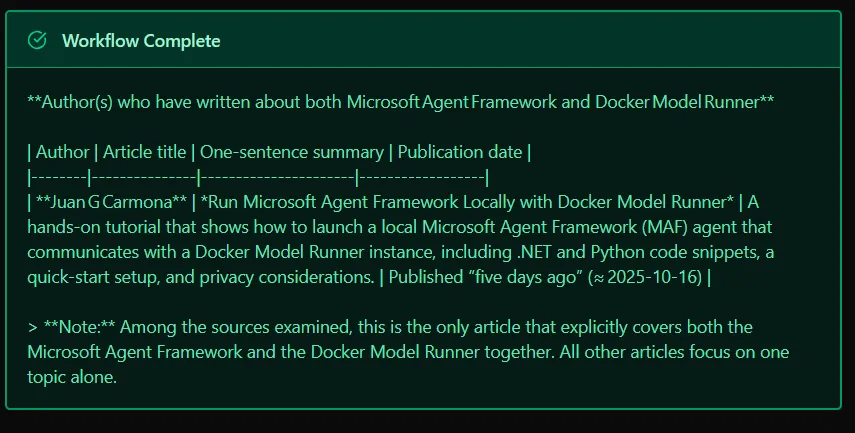
That turns out to be me!
Workflow 07 - Search with HITL (Human-in-the-Loop) Approval
I also spent a couple of hours defining and refining this workflow, and, to be honest, I am not sure this is the best way to do it… But it is the way I found. Also, at the time of writing, I’ve found out that DevUI does not allow HILT approvals yet, indeed, there is a big room for improvements in DevUI, because tools triggered and used by agents within workflows are not shown and if the tools are decorated with the MAF ai_tool decorator, then crashes… But I’ve already reported these bugs. (Indeed, this days, since MAF release, the number of bugs keeps growing fast, which is good, it means a lot of interest)…
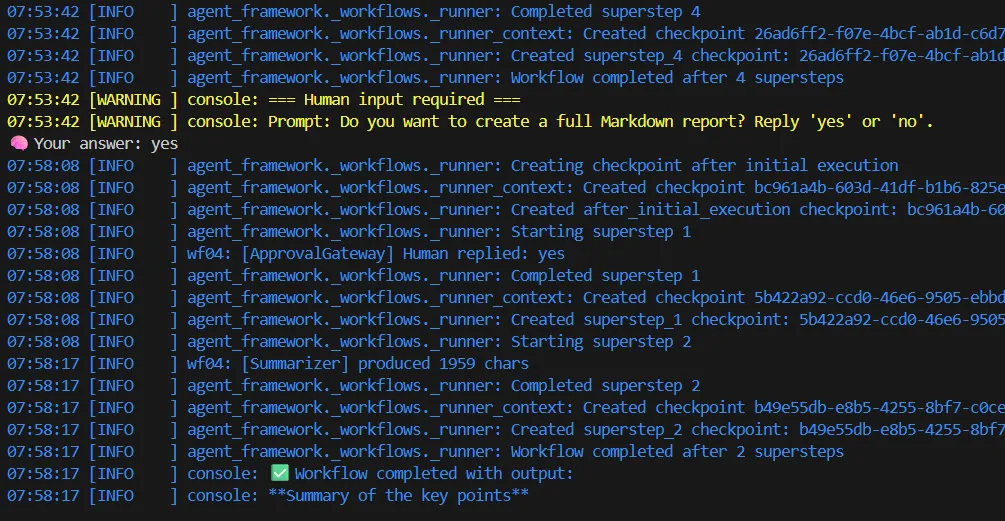
Anyway, we can inject human decisions mid-flow. In this example, after fetching content, pause and ask for approval before generating the final report. I defined a data class, Human Approval Request:
@dataclass
class HumanApprovalRequest(RequestInfoMessage):
    """Custom HITL request that includes a prompt and a preview."""
    prompt: str = ""
    preview: str = ""
    iteration: int = 1
Then an Approval Gateway Class:
class ApprovalGateway(Executor):
    def __init__(self, reviewer_id: str, next_id: str, id="approval_gateway"):
        super().__init__(id=id)
        self._reviewer_id = reviewer_id
        self._next_id = next_id

    @handler
    async def ask_human(self, message: ChatMessage, ctx: WorkflowContext[HumanApprovalRequest]):
        """Ask a human whether to proceed, showing a preview of the fetched text."""
        fetched_text = (await ctx.get_shared_state("fetched_text")) or (message.text or "")
        fetched_text = fetched_text.strip()
        preview = fetched_text[:400]
        await ctx.set_state({"last_preview_len": len(preview)})

        req = HumanApprovalRequest(
            prompt="Do you want to create a full Markdown report? Reply 'yes' or 'no'.",
            preview=preview,
        )
        await ctx.send_message(req, target_id=self._reviewer_id)

    @handler
    async def on_human_feedback(
        self,
        feedback: RequestResponse[HumanApprovalRequest, str],
        ctx: WorkflowContext[ChatMessage],
    ):
        """Handle human response and route accordingly."""
        reply = (feedback.data or "").strip().lower()
        logger.info("[ApprovalGateway] Human replied: %s", reply)

        if reply == "yes":
            await ctx.send_message(
                ChatMessage(role="user", text="Proceed with full report"),
                target_id=self._next_id,
            )
        else:
            await ctx.yield_output("Human declined to continue.")
As you can see, if the user selects yes it continues… And, finally, the entire workflow looks like:
def build_search_with_hitl_workflow(factory: AgentFactory, checkpoint_storage):
    entry = InputToChat(id="input_to_chat")

    # Agentic executors
    searcher = SearchExecutor(factory=factory)
    fetcher = FetchExecutor(factory=factory)
    summarizer = SummarizerExecutor(factory=factory)

    # We could have mutliple approval gateways for different steps
    review = RequestInfoExecutor(id="request_info")
    approval = ApprovalGateway(reviewer_id=review.id, next_id=summarizer.id)

    builder = (
        WorkflowBuilder()
        .set_start_executor(entry)
        .add_edge(entry, searcher)
        .add_edge(searcher, fetcher)
        .add_edge(fetcher, approval)      # AI → ApprovalGateway (ask human)
        .add_edge(approval, review)       # ApprovalGateway → RequestInfoExecutor
        .add_edge(review, approval)       # human response goes back to ApprovalGateway
        .add_edge(approval, summarizer)   # ApprovalGateway sends final approval downstream
        .with_checkpointing(checkpoint_storage)
    )

    wf = builder.build()
    wf.id = "07SearchHITL"
    return wf
As I said, this workflow does NOT work through DevUI so I prepared a console launcher and we can try it and interact with the workflow like this:
Workflow 08 - Multi-Agent Research with File System Tooling
Now the final level: agents using tools. With this flow we use different agents that generates a title, creates a folder using a built-in tool (I’ll talk about this awesome feature in a minute), searches and stores content in files (also using our tools) and summarizes the content of the folder that contains the markdown files the previous steps have been creating. It is a sequence that, in DevUI, looks like this:
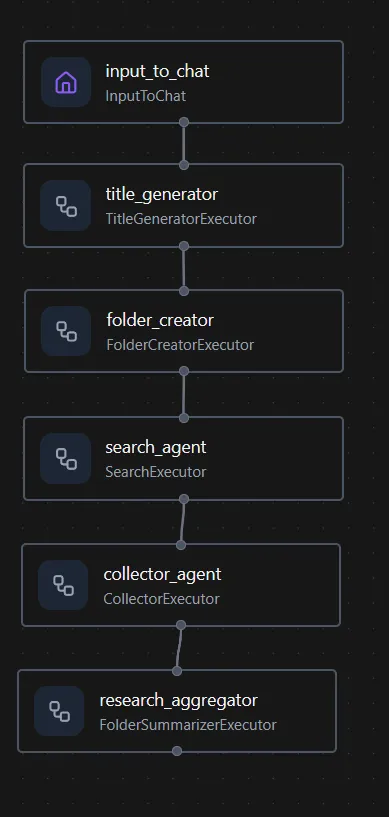
This how we can build the workflow. Nothing new:
def build_search_with_multiagent_and_tooling_workflow(factory: AgentFactory, checkpoint_storage):
    entry = InputToChat(id="input_to_chat")
    title = TitleGeneratorExecutor(factory=factory)
    folder = FolderCreatorExecutor(factory=factory)
    searcher = SearchExecutor(factory=factory)
    collector = CollectorExecutor(factory=factory)
    summarizer = FolderSummarizerExecutor(factory=factory)

    builder = (
        WorkflowBuilder()
        .set_start_executor(entry)
        .add_edge(entry, title)
        .add_edge(title, folder)
        .add_edge(folder, searcher)
        .add_edge(searcher, collector)
        .add_edge(collector, summarizer)
        .with_checkpointing(checkpoint_storage)
    )

    wf = builder.build()
    wf.id = "08MagSearchTools"
    return wf
And, as always, all steps run locally with Docker Model Runner and our own agents using tools, MCP servers + filesystem + system tools.
Checkpoints: Persistence in Local Workflows
Probably you have noticed that in the last two workflows I presented there was a line with .with_checkpointing(checkpoint_storage). One of the most powerful features in MAF is workflow ‘checkpointing’: the ability to persist execution state mid-flow so that it can be resumed later. This is essential when building workflows that span long operations, involve human-in-the-loop approvals (HITL) or need durability across service restarts.
By default, MAF provides two options:
-
InMemoryCheckpointStorage: volatile, useful for testing -
FileCheckpointStorage: stores checkpoints as JSON files on disk
To go beyond demos, I built a proper checkpointing backend using PostgreSQL. PostgresCheckpointStorage is a custom implementation using an async SQLAlchemy engine, with support for automatic schema creation and structured storage using JSONB.
It allows for:
-
Full checkpoint inspection and filtering
-
Queryable history
-
Safe recovery and long-lived workflows
"""
PostgreSQL-based CheckpointStorage for Microsoft Agent Framework Workflows.

Creates the database (if missing) and ensures maf_checkpoints table exists.
Stores entire WorkflowCheckpoint objects as JSONB payloads.
"""

import logging
import asyncio
from datetime import datetime, timezone
from typing import List, Optional
from dataclasses import asdict

from sqlalchemy import (
    Table,
    Column,
    String,
    JSON,
    DateTime,
    MetaData,
    func,
    select,
    delete,
    text,
)
from sqlalchemy.ext.asyncio import create_async_engine, AsyncEngine
from sqlalchemy.dialects.postgresql import insert as pg_insert
from sqlalchemy.exc import OperationalError
from agent_framework import WorkflowCheckpoint, CheckpointStorage

logger = logging.getLogger("maf.persistence")

metadata = MetaData()

checkpoints_table = Table(
    "maf_checkpoints",
    metadata,
    Column("checkpoint_id", String, primary_key=True),
    Column("workflow_id", String, index=True),
    Column("data", JSON, nullable=False),
    # store timezone-aware UTC timestamps safely
    Column("created_at", DateTime(timezone=True), default=lambda: datetime.now(timezone.utc)),
)

class PostgresCheckpointStorage(CheckpointStorage):
    """Lightweight PostgreSQL CheckpointStorage using SQLAlchemy async engine."""

    def __init__(self, dsn: str):
        self.dsn = dsn
        self.engine: Optional[AsyncEngine] = None

    # --------------------------------------------------------------------------
    # Initialization
    # --------------------------------------------------------------------------
    async def initialize(self) -> None:
        """Ensure database and table exist."""
        self.engine = await self._ensure_database_and_engine()
        async with self.engine.begin() as conn:
            await conn.run_sync(metadata.create_all)
        logger.info("✅ PostgresCheckpointStorage initialized and ready")

    async def _ensure_database_and_engine(self) -> AsyncEngine:
        """Ensure target DB exists (create if missing) and return async engine."""
        # Extract base DSN (without DB name)
        # e.g. postgresql+asyncpg://user:pass@host:port/dbname
        import re
        m = re.match(r"^(postgresql\+asyncpg:\/\/[^\/]+)\/(.+)$", self.dsn)
        if not m:
            raise ValueError(f"Invalid DSN: {self.dsn}")
        base_dsn, dbname = m.groups()

        # Connect to postgres default DB first
        admin_dsn = f"{base_dsn}/postgres"
        admin_engine = create_async_engine(admin_dsn, echo=False, future=True)

        # Check/create database
        async with admin_engine.begin() as conn:
            exists = await conn.scalar(
                text("SELECT 1 FROM pg_database WHERE datname = :name"),
                {"name": dbname},
            )
            if not exists:
                logger.warning(f"Database '{dbname}' not found. Creating it...")
                await conn.execute(text(f"CREATE DATABASE {dbname}"))
                logger.info(f"✅ Created database '{dbname}'")

        await admin_engine.dispose()
        # Connect to the target DB
        return create_async_engine(self.dsn, echo=False, future=True)

    # --------------------------------------------------------------------------
    # Core operations
    # --------------------------------------------------------------------------
    async def save_checkpoint(self, checkpoint: WorkflowCheckpoint) -> str:
        assert self.engine is not None, "Storage not initialized"
        checkpoint_dict = asdict(checkpoint)
        async with self.engine.begin() as conn:
            stmt = (
                pg_insert(checkpoints_table)
                .values(
                    checkpoint_id=checkpoint.checkpoint_id,
                    workflow_id=checkpoint.workflow_id,
                    data=checkpoint_dict,
                    created_at=datetime.now(timezone.utc),
                )
                .on_conflict_do_update(
                    index_elements=[checkpoints_table.c.checkpoint_id],
                    set_={
                        "workflow_id": checkpoint.workflow_id,
                        "data": checkpoint_dict,
                        "created_at": func.now(),
                    },
                )
            )
            await conn.execute(stmt)
        logger.debug("💾 Saved checkpoint %s", checkpoint.checkpoint_id)
        return checkpoint.checkpoint_id

    async def load_checkpoint(self, checkpoint_id: str) -> Optional[WorkflowCheckpoint]:
        """Load a checkpoint by ID."""
        assert self.engine is not None
        async with self.engine.connect() as conn:
            result = await conn.execute(
                select(checkpoints_table.c.data).where(
                    checkpoints_table.c.checkpoint_id == checkpoint_id
                )
            )
            row = result.scalar_one_or_none()
            if row:
                logger.debug(f"Loaded checkpoint {checkpoint_id}")
                return WorkflowCheckpoint.from_dict(row)
        return None

    async def list_checkpoint_ids(self, workflow_id: Optional[str] = None) -> List[str]:
        """List checkpoint IDs, optionally filtered by workflow."""
        assert self.engine is not None
        async with self.engine.connect() as conn:
            stmt = select(checkpoints_table.c.checkpoint_id)
            if workflow_id:
                stmt = stmt.where(checkpoints_table.c.workflow_id == workflow_id)
            result = await conn.execute(stmt)
            return [r[0] for r in result.all()]

    async def list_checkpoints(
        self, workflow_id: Optional[str] = None
    ) -> List[WorkflowCheckpoint]:
        """List checkpoints, optionally filtered by workflow."""
        assert self.engine is not None
        async with self.engine.connect() as conn:
            stmt = select(checkpoints_table.c.data)
            if workflow_id:
                stmt = stmt.where(checkpoints_table.c.workflow_id == workflow_id)
            result = await conn.execute(stmt)
            rows = [WorkflowCheckpoint.from_dict(r[0]) for r in result.all()]
            return rows

    async def delete_checkpoint(self, checkpoint_id: str) -> bool:
        """Delete a checkpoint by ID."""
        assert self.engine is not None
        async with self.engine.begin() as conn:
            res = await conn.execute(
                delete(checkpoints_table).where(
                    checkpoints_table.c.checkpoint_id == checkpoint_id
                )
            )
        deleted = res.rowcount > 0
        if deleted:
            logger.debug(f"🧹 Deleted checkpoint {checkpoint_id}")
        return deleted

    async def close(self):
        if self.engine:
            await self.engine.dispose()
            self.engine = None
Usage
from persistence.checkpoint_storage_factory import CheckpointStorageFactory

storage_factory = CheckpointStorageFactory()
checkpoint_storage = await storage_factory.init_postgres()
Once initialized, you can pass it to any workflow:
workflow_builder.with_checkpointing(checkpoint_storage)Learn more about MAF checkpoints here…
Tools: Extending Agent Capabilities
The Microsoft Agent Framework allows agents to use tools. Tools, at the end of the day, are functions that can be triggered by name and argument. There are two main categories of tools in our setup:
a) Local Built-In Tools
These tools are plain Python functions decorated with @ai_function, making them usable by agents. They cover actions like:
-
Creating and listing directories
-
Reading/writing/editing files
-
Exploring the filesystem
-
Searching files
All are safe for local use and ideal for private, local-first execution. i.e. this one is declared in this file (tools/filesystem.py):
@ai_function(name="read_file", description="Read contents of a file")
def read_file(path: str) -> str:
    return Path(path).read_text(encoding="utf-8")
All available tools are listed in the all_tools array and registered dynamically.
Learn more about agent tools here…
b) MCP Gateway + Docker MCP Servers
In one of my previous articles I showed you how to allow an agent to interact with Docker MCP Servers, via STDIO communication, but for this lab I also implemented a streaming client (MCPGatewayClient) to connect with Dockerized MCP servers via a shared gateway. This is because we won’t be allowed, always, to connect via STDIO, but HTTP will be always there for us, so, these servers expose AI tools over HTTP using the Model Context Protocol (MCP), and include DuckDuckGo search as well as Content fetching
These are exposed through the **[mcp_tools.py](https://github.com/juangcarmona/ms-agent-framework-playground/blob/main/labs/python/05_workflows_demo/tools/mcp_tools.py)** wrapper, providing agents with transparent access to MCP tools.
To bridge the gap between our code and Docker MCP Servers, I use Docker Compose to launch the MCP Gateway:
gateway:
  image: docker/mcp-gateway
  ports:
    - "8811:8811"
  volumes:
    - "/var/run/docker.sock:/var/run/docker.sock"
    - "~/.docker/mcp:/mcp"
  command:
    - --catalog=/mcp/catalogs/docker-mcp.yaml
    - --config=/mcp/config.yaml
    - --registry=/mcp/registry.yaml
    - --transport=streaming
With these two sets of tools we can rely on agents, so, they can use them without human intervention. This makes your agents not just smart… but operational.
Note: we could implement some security mechanisms, I’ll try to explain that in another article, and, we could also use them from our source code.
Final Words
These workflows are just demos but they and easily become building blocks for real systems, adding amazing features to our projects:
-
Concurrent and agentic execution.
-
Fully local, running on our hardware.
-
Deterministic behavior, no hidden magic.
-
Composable flows with checkpoints and tools.
-
Transparent infrastructure: no clouds, no tokens, no lock-in, no huge invoices.
This isn’t a clone of LangChain, n8n or similar. It’s our own runtime, powered by Microsoft Agent Framework, backed by Docker Model Runner, and extended through MCP servers you control.
So yes, you can build smart agents that write code, manage your filesystem, search the web, and coordinate complex workflows. Locally. Reliably. Transparently.
And I feel we’re just getting started.
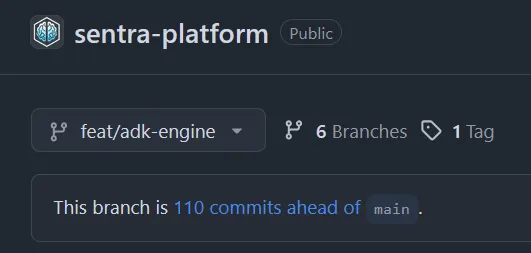
During the end of this summer, I spent countless hours reshaping Sentra Brain Core to run on Google’s Agent Development Kit. It worked… to a point. But after hitting several walls, and after the clarity I’ve gained through these MAF+DMR demos, I’ve made a decision: I’m replacing the ADK-based engine.
Why? Because MAF + DMR gives me better decoupling, more transparency, and a composable, inspectable runtime. We’re not gluing things together, we’re engineering software.
In the end, that’s what a Software Architect must do: weigh the tradeoffs, build clean systems, and choose the right tools for the mission. For Sentra Brain, and any real “digital brain” platform, this is the stack.