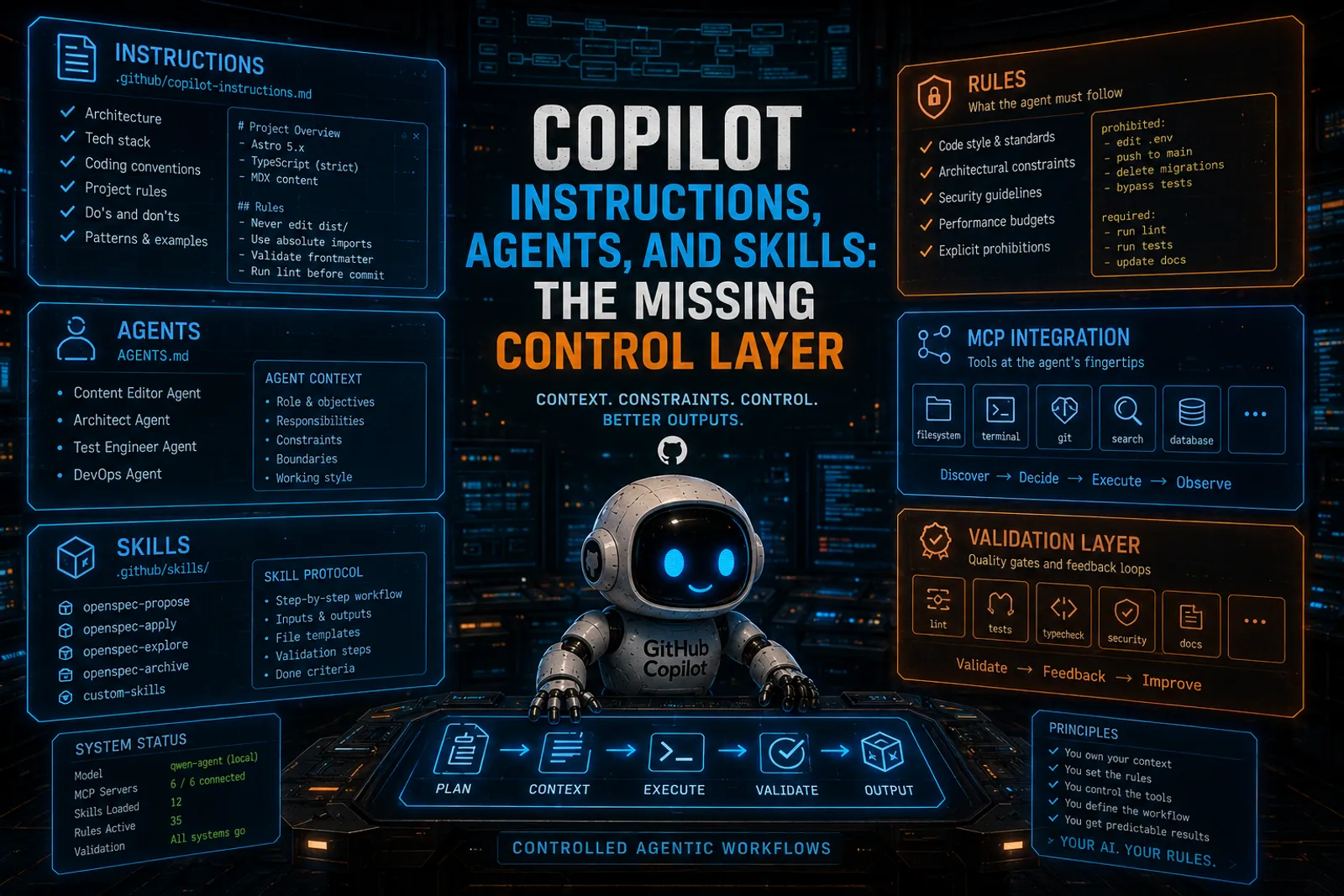
Copilot Instructions, Agents, and Skills: The Missing Control Layer
This is article 4 of a series. Start with Mayday! We’re Running Out of Fuel! for the manifesto, or How I Set Up GitHub Copilot CLI on Local Hardware for the setup story.
In the setup guide I showed how to connect Copilot CLI to a local model. In the MCP article I showed how tools give the agent actions. Today I want to talk about the third layer: the one that tells the agent who it is, what your project is, and how it should behave.
This is the control surface. And most people skip it entirely.
Why control matters more with local models
Cloud frontier models like GPT-4 or Claude can often wing it. They have massive training data, strong instruction-following, and enough reasoning power to figure out your project’s conventions on the fly.
A local 7B or even 27B model does not have that luxury. Its context window is shorter. Its training data is smaller. Its reasoning is more fragile.
That means it benefits enormously from explicit context. Tell it what your project is. Tell it what conventions matter. Tell it what to never touch. The more you reduce ambiguity, the better the output.
Cloud models can compensate for lazy prompts. Local models punish you for them.
Fair enough. Give them instructions.
Custom instructions: .github/copilot-instructions.md
This is the main entry point. Copilot CLI reads this file from your repository and injects it into every prompt. It’s persistent context that governs all interactions.
On this very blog, my copilot-instructions.md describes:
- The Astro 5.x architecture and content pipeline
- The frontmatter schema (required fields, types, constraints)
- The bilingual routing system (
/en/and/es/paths) - The image handling pattern (relative paths in content directories)
- The build and dev commands
- The TypeScript strict mode and type patterns
This is not documentation for humans. This is documentation for agents. The difference matters because agent-facing documentation needs to be:
- Precise: no ambiguity, no “it depends”
- Actionable: concrete rules, not philosophy
- Scoped: focused on what the agent needs for its tasks
- Current: out-of-date instructions are worse than none
Here’s a simplified example:
# Copilot Instructions for my-project

## Architecture
- Framework: Astro 5.x with MDX support
- Content: `src/content/blog/` with Markdown frontmatter
- Build: `npm run build` (static generation)

## Content Schema
Required frontmatter fields:
- `title` (string, min 5 chars)
- `description` (string, 10-300 chars)
- `pubDate` (ISO date string)

Optional: `tags[]`, `heroImage`, `lang` ('en'|'es')

## Rules
- Never modify files outside `src/content/` without asking
- Always validate frontmatter against schema before saving
- Use relative image paths within content directories
- Sort blog listings by `pubDate` descending
That file saves me from correcting the agent every time it forgets the schema or tries to write images to the wrong directory.
Path-specific instructions
Global instructions are a good start, but sometimes you need different rules for different parts of the codebase. Copilot supports path-specific instructions via files in .github/instructions/.
Each file uses frontmatter with an applyTo glob pattern:
---
applyTo: "src/components/**/*.astro"
---

# Component conventions
- Use `interface Props` for typed props
- Use `<style>` blocks for component-scoped CSS
- Never import global styles in components
---
applyTo: "src/content/blog/**/*.md"
---
# Content conventions
- Always include required frontmatter fields
- Use heading levels starting from H2 (H1 is the title)
- Reference images with relative paths from the post directoryPath-specific instructions are scoped: they only apply when the agent works on files matching the pattern. That means you can have strict rules for content and different rules for components without polluting either context.
AGENTS.md: agent personas
AGENTS.md files define specialized agent behaviors. Think of them as role definitions that tell the agent how to behave in a specific context.
You can place AGENTS.md at the repository root or in any subdirectory. The closest one to the current working context wins.
# Content Editor Agent

You are a bilingual blog content editor working on an Astro static site.

## Responsibilities
- Create and edit blog posts in `src/content/blog/`
- Validate frontmatter against the schema in `content.config.ts`
- Maintain consistent heading structure
- Ensure images exist before referencing them

## Constraints
- Never modify layout files or components
- Never change the build configuration
- Always preserve existing post slugs
This is especially useful when you have different workflows for different parts of your project. A “content editor” agent should not touch your build pipeline. An “infrastructure” agent should not edit blog posts.
Skills: structured workflows
Skills are where things get really interesting. While instructions tell the agent what, skills tell it how.
On this blog I have OpenSpec skills installed in .github/skills/. Each skill is a directory with a SKILL.md file that defines a structured workflow: what steps to follow, which tools to call and when, and what the expected output looks like. Four of them: propose, apply, explore, and archive. Instead of asking “please propose a change” and hoping for the best, the agent reads the skill, follows the steps, uses the right tools, and produces structured output.
You stop hoping. You start orchestrating.
The hierarchy: instructions vs agents vs skills vs MCP
These four layers serve different purposes and work together:
| Layer | What it provides | Scope |
|---|---|---|
| Instructions | Project context, conventions, rules | Every interaction |
| Path-specific instructions | Scoped rules for specific file types | Matching files only |
| AGENTS.md | Agent persona and behavioral constraints | Directory-scoped |
| Skills | Structured multi-step workflows | On-demand |
| MCP servers | External tool access (tests, lint, search) | Always available |
Instructions set the baseline. Agents define the role. Skills define the protocol. MCP provides the tools. Together, they give you the control surface that turns a raw LLM into something you can actually trust with your codebase.
Real example: how my blog is wired
On this blog (the one you’re reading), the control surface looks like this:
-
copilot-instructions.mddescribes the Astro architecture, the content schema, the bilingual routing, the dev commands. Every interaction has this context. -
OpenSpec skills in
.github/skills/give the agent structured workflows for proposing, implementing, and archiving changes. When I say “propose a change,” the agent follows a protocol: it creates a design document, writes specs, generates a task list. -
openspec/config.yamlconfigures the spec-driven workflow: where specs live, what schema to use, how to organize changes. -
MCP servers (when active) give the agent access to test runners and linting.
The result: I can sit at my terminal, type copilot-local, and get an agent that understands my project, follows my workflows, uses my tools, and runs entirely on my hardware.
And yes, it works. Daily. Not as a demo, but as part of my actual development infrastructure.
Writing good instructions for local models
A few practical tips from my experience:
Be explicit about file paths. Don’t say “the content directory.” Say “src/content/blog/.”
State constraints as rules, not preferences. Don’t say “it’s usually better to…” Say “Always…” or “Never…”
Include the schema. If your content has a validation schema, put it in the instructions. The agent can’t check a schema it doesn’t know about.
Keep it current. Stale instructions are worse than none. If you refactor your project structure, update the instructions. I treat copilot-instructions.md as a living document, not a set-and-forget config.
Don’t over-write. Instructions are injected into every prompt. If they’re too long, they consume context window that the agent needs for the actual task. Be precise, not exhaustive.
This series
- Mayday! Mayday! We’re Running Out of Fuel! — the manifesto
- How I Set Up GitHub Copilot CLI on Local Hardware — setup and wiring
- MCP Is How Local Copilot Becomes Useful — tools, not magic
- You are here — Copilot Instructions, Agents, and Skills
- Running SDD Workflows with Local Copilot — specification-driven development
- VSCode Agents Window: An AI Harness Inside Visual Studio Code, the convergence
References
- How I Set Up GitHub Copilot CLI on Local Hardware -> the setup and wiring guide
- MCP Is How Local Copilot Becomes Useful -> the tool layer
- Spec-Driven Development: Controlling AI-Generated Drift -> why structure matters
- Moving Toward SDD with OpenSpec or Spec Kit -> frameworks for structured development
- GitHub Copilot custom instructions docs -> official reference
Remember:
Your AI. Your rules.